What's the case?
You want to create different Date Filters for full months based on today or your workdate?
Dynamics 365 Business Central offers multiple ways to enter dates and times, including powerful features that accelerate data entry, or help you write complex calendar expressions.
Take a look here:
Working with Calendar Dates and Times
If you are using CM = Current month you will discover an issue:
This is our code example, using these variables:
TodayLbl: Label 'Today: %1\\';
PrevMonthLbl: Label 'Previous Month. From: %1 To: %2\\';
ThisMonthLbl: Label 'This Month. From: %1 To: %2\\';
NextMonthLbl: Label 'Next Month. From: %1 To: %2\\';
Next2MonthLbl: Label 'Next 2 Months. From: %1 To: %2\\';
MessageTxt: Text;
And this is our code:
MessageTxt := StrSubstNo(TodayLbl, Today());
MessageTxt += StrSubstNo(PrevMonthLbl, CalcDate('<-CM-1M>', TODAY()), CalcDate('<CM-1M>', TODAY()));
MessageTxt += StrSubstNo(ThisMonthLbl, CalcDate('<-CM>', TODAY()), CalcDate('<CM>', TODAY()));
MessageTxt += StrSubstNo(NextMonthLbl, CalcDate('<-CM+1M>', TODAY()), CalcDate('<CM+1M>', TODAY()));
MessageTxt += StrSubstNo(Next2MonthLbl, CalcDate('<-CM+2M>', TODAY()), CalcDate('<CM+2M>', TODAY()));
Message(MessageTxt);
And this Message will throw:
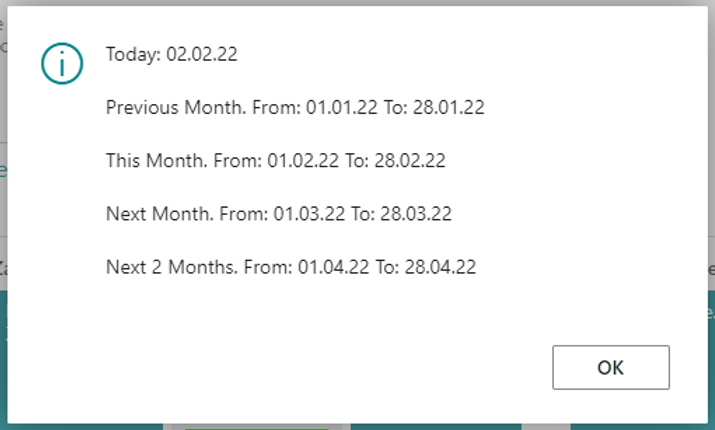
Not very useful, right?
Are you aware of the PeriodPageManagement Codeunit?
Calendar: Record Date;
PeriodPageMgt: Codeunit PeriodPageManagement;
And this code:
Calendar."Period Start" := CalcDate('<CM-1M>', TODAY());
PeriodPageMgt.FindDate('<', Calendar, Enum::"Analysis Period Type"::Month);
MessageTxt += StrSubstNo(PrevMonthLbl, Calendar."Period Start", Calendar."Period End");

Calendar."Period Start" := CalcDate('<CM>', TODAY());
PeriodPageMgt.FindDate('<', Calendar, Enum::"Analysis Period Type"::Month);
MessageTxt += StrSubstNo(ThisMonthLbl, Calendar."Period Start", Calendar."Period End");

Calendar."Period Start" := CalcDate('<CM+1M>', TODAY());
PeriodPageMgt.FindDate('<', Calendar, Enum::"Analysis Period Type"::Month);
MessageTxt += StrSubstNo(NextMonthLbl, Calendar."Period Start", Calendar."Period End");

Calendar."Period Start" := CalcDate('<CM+2M>', TODAY());
PeriodPageMgt.FindDate('<', Calendar, Enum::"Analysis Period Type"::Month);
MessageTxt += StrSubstNo(Next2MonthLbl, Calendar."Period Start", Calendar."Period End");
Message(MessageTxt);
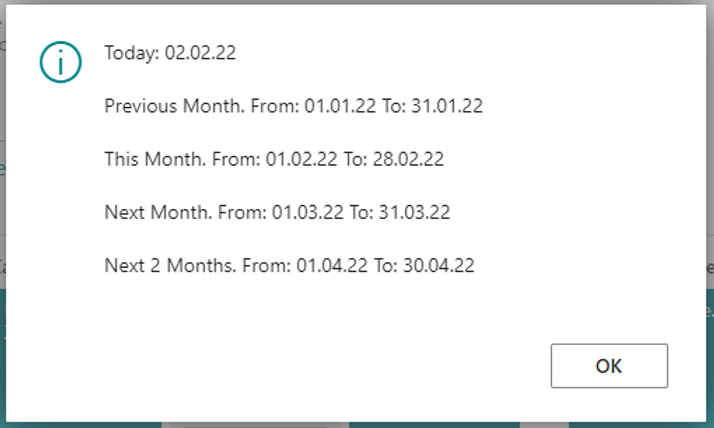
And this will determine the correct start- and ending dates of each month:
Happy Coding! 💡
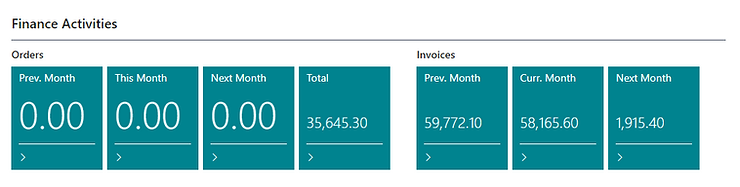
So you can easily create some cues: