

You want to split your objects by using a simple PowerShell script?
You can use this module:
Microsoft.Dynamics.Nav.Model.Tools
with the command Split-NAVApplicationObjectFile
No matter which version of Navision, Dynamics NAV or Business Central in C/AL you are using:
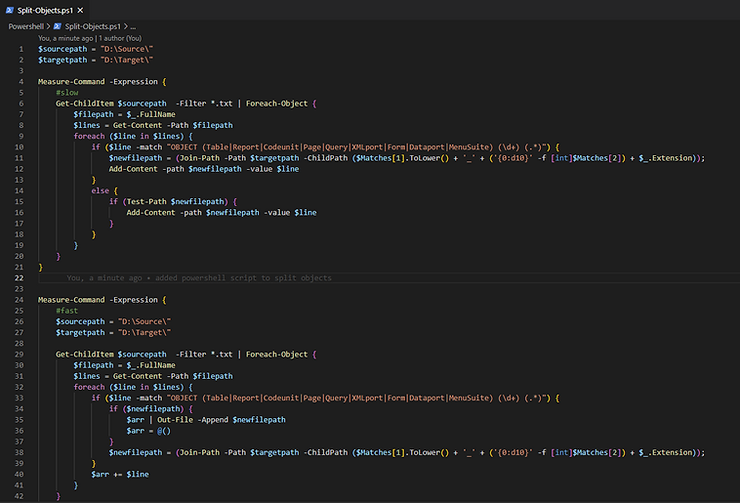
I've built a slow and fast variant ;-) so don't get confused.
#fast
$sourcepath = "D:\Source\"
$targetpath = "D:\Target\"
Remove-Item $targetpath\*.txt -Recurse -Force

Measure-Command -Expression {
  Get-ChildItem $sourcepath -Filter *.txt | ForEach-Object {
    $filepath = $_.FullName
    $lines = Get-Content -Path $filepath
    foreach ($line in $lines) {
      if ($line -match "OBJECT (Table|Report|Codeunit|Page|Query|XMLport|Form|Dataport|MenuSuite) (\d+) (.*)") {
        if ($newfilepath) {
          $arr | Out-File -Append $newfilepath -Encoding default
          $arr = @()
        }
        $newfilepath = (Join-Path -Path $targetpath -ChildPath (
          $Matches[1].ToLower() + '_' + ('{0:d10}' -f [int]$Matches[2]) + $_.Extension
        ))
      }
      $arr += $line
    }
  }
}
And see how fast these two functions are:
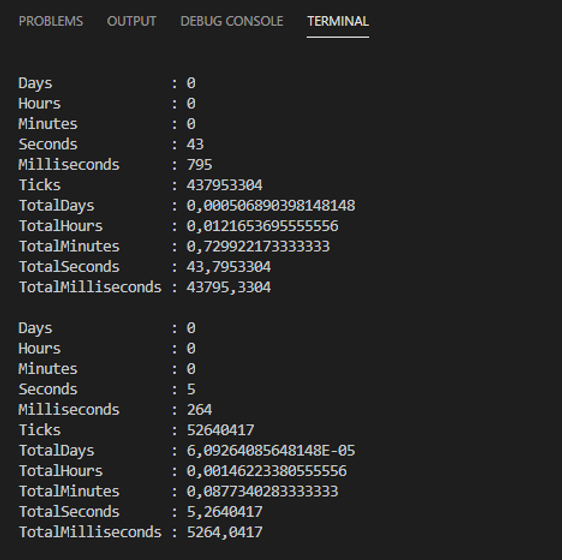
Get the script here: Split-Objects.ps1
https://github.com/byndit/UsefulScripts/tree/main/Powershell

