

In the dynamic world of AL development for Business Central apps, one task that often arises is the renumbering of object IDs. Whether you're refactoring code or adapting to a new number range, choosing the right approach can make a significant difference in efficiency and maintainability. Today, I’m excited to share two popular patterns for renumbering object IDs: the Mapping Pattern and the Delta Pattern. Let’s explore how each can be utilized effectively! 🎉
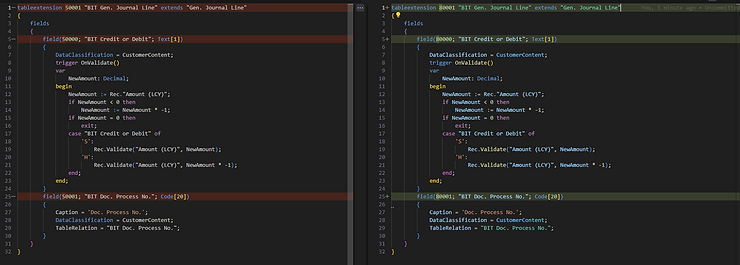
Renumber your Objects from an old id to a new one:
📚 The Mapping Pattern
The Mapping Pattern is all about defining specific mappings between old and new object IDs. This approach is particularly useful when you need precise control over which IDs map to which new values. It’s like having a custom GPS for your object IDs! 🗺️
How the Mapping Pattern Works
You create a dictionary that explicitly maps each old ID to its corresponding new ID. This method ensures that every object gets exactly the ID you want.
$Path = "C:\YourRepoPath\"

$mapping = @{
    '50000' = '80000'
    '50001' = '80001'
    '50002' = '80002'
    '50003' = '80003'
    '50004' = '80004'
}

$regexescape = $mapping.Keys | ForEach-Object {[System.Text.RegularExpressions.Regex]::Escape($_)}
$regex = [regex]($regexescape -join '|')

Get-ChildItem -Path $Path -Recurse -File -Filter *.al | ForEach-Object {
    try {
        $values = { $mapping[$args[0].Value] }
        $incomingfile = [System.IO.File]::ReadAllText($_.FullName)
        $incomingfile = $regex.Replace($incomingfile, $values)
        [System.IO.File]::WriteAllText($_.FullName, $incomingfile)
    }
    catch {
        Write-Error "Failed to process file $_.FullName: $_"
    }
}
Benefits of the Mapping Pattern
- Control: Offers precise control over the ID assignments. 🎯
- Readability: The mappings are clear and explicit, making the code easy to read. 📖
- Specificity: Ideal for scenarios where specific IDs need to be assigned to particular objects. 🔍
Drawbacks of the Mapping Pattern
- Scalability: Can become cumbersome if you have a large number of object IDs. 🐢
- Maintenance: Updating the mapping requires manual changes to each entry. ✍️
🔄 The Delta Pattern
The Delta Pattern introduces a more dynamic approach by applying a fixed delta to each object ID. This method is perfect when you need a simple, scalable way to renumber IDs consistently. It’s like a conveyor belt for your IDs! 🚚
How the Delta Pattern Works
You specify a delta value that will be added to each old ID to produce the new ID. This pattern automates the renumbering process, making it highly efficient.
$delta = 30000

function Calculate-NewId {
    param (
        [string]$oldId
    )
    $newId = ([int]$oldId) + $delta
    return $newId.ToString()
}

function Replace-ObjectIds {
    param (
        [string]$content
    )
    $regexPattern = '\b\d{5}\b'
    $replacer = {
        param ($match)
        return Calculate-NewId -oldId $match.Value
    }
    return [regex]::Replace($content, $regexPattern, $replacer)
}

Get-ChildItem -Path $Path -Recurse -File -Filter *.al | ForEach-Object {
    try {
        $incomingFileContent = [System.IO.File]::ReadAllText($_.FullName)
        $updatedContent = Replace-ObjectIds -content $incomingFileContent
        [System.IO.File]::WriteAllText($_.FullName, $updatedContent, [System.Text.Encoding]::UTF8)
    }
    catch {
        Write-Error "Failed to process file $_.FullName: $_"
    }
}
Benefits of the Delta Pattern
- Simplicity: Easy to implement with minimal configuration. 🛠️
- Scalability: Handles large numbers of object IDs effortlessly. ⚡
- Automation: Reduces the need for manual input, minimizing errors. 🤖
Drawbacks of the Delta Pattern
- Flexibility: Offers less control over specific ID assignments. 🔒
- Uniformity: May not be suitable for scenarios requiring custom mappings. 🚧
🤔 Which Pattern Should You Choose?
The choice between the Mapping Pattern and the Delta Pattern largely depends on your specific needs:
- Use the Mapping Pattern if you require precise control over each object ID. It's ideal for projects where specific IDs are necessary for compliance or integration. 🏗️
- Use the Delta Pattern if you need a fast and scalable solution for renumbering. It's perfect for large projects where a uniform change is required. 🚀
🎯 Conclusion
Both the Mapping Pattern and Delta Pattern have their unique strengths and can be powerful tools in your AL development toolkit. By understanding their differences, you can make informed decisions to streamline your development process and improve code management.
Happy coding! 💻✨
Feel free to share your experiences with these patterns in the comments below. Let’s continue the conversation and explore more ways to enhance our AL development workflows! 🚀💬
Get our Scripts on GitHub:
https://github.com/byndit/UsefulScripts

